


Wanderlog - Trip Planner App
4.73.39K Reviews
App Specs
- Version
- 2.219
- Updated On
- License
- Free
- Downloads
- 1,000,000+
- Developer
- Wanderlog
- Categories
- Travel & Local
- Platform
- Android
Screenshots
 Analysis by AppCompare
On the first trip I plan with a new travel app, I want to know whether it can turn a loose collection of ideas into a plan I can actually use. Wanderlog makes a good first impression because it brings places, days, routes, and travel notes together instead of leaving them scattered across maps, browser tabs, and messages. It is a travel-planning app from Wanderlog, and its strongest appeal is practical: I can see what I might do and where it fits, rather than just collect a list of places.
Why the first week feels promising
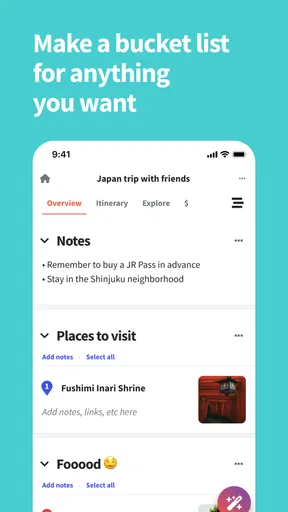
Planning a trip often starts before anyone knows the exact schedule. I might have a hotel in mind, a few restaurants saved, and a list of attractions someone sent in a group chat. Putting those pieces into one itinerary gives them context. A restaurant can sit near the activity planned for that day, while the map helps reveal when two appealing stops are on opposite sides of town. That early sense of order is where the app earns its place quickly.
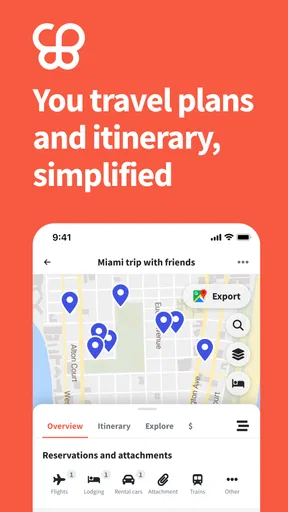
The map-and-itinerary combination is more useful than a plain checklist when a trip has several stops. A checklist can tell me what I want to see, but it does not make the geography obvious. Here, the visual layout can prompt a better question: does this visit belong on the day I assigned it, or would it make more sense alongside another nearby stop? That small planning check can prevent an itinerary from becoming a string of back-and-forth journeys.
Where it fits beside familiar travel tools
I see this as a planner that sits between a simple notes app and a collection of specialist travel services. Notes are quicker for a handful of ideas, and a navigation app is better when I need turn-by-turn directions right now. Wanderlog is more useful in the middle stage, when I am deciding how the pieces of a trip fit together. Its itinerary and map can make the overall plan easier to discuss than a long message or spreadsheet.
It is also not a reason to discard every other travel tool. I would still use a booking service for reservations and a dedicated navigation app for live directions when I need them. The advantage here is the shared trip overview, not replacing every part of travel. If I only need one address or a reminder to pack something, opening a full itinerary can be more work than using a note. The app makes most sense when there is enough planning to benefit from a map and day-by-day structure.
A realistic planning routine
Imagine I am arranging a weekend in a city with a friend. I can add the hotel, a museum we both want to visit, and a few food options, then use the map to see which choices sit near one another. We can shape a day around a neighborhood rather than cram in every saved place. If the weather changes or one stop takes longer than expected, the itinerary gives us a reference point for choosing what to drop without losing track of the rest of the trip.
That is a more useful way to think about travel planning than treating the itinerary as a contract. I would use it to make decisions easier, not to force every hour into a fixed schedule. A flexible plan can show the main destination and nearby alternatives while leaving room to wander. For a trip with companions, the shared planning option can also surface preferences before departure, when it is easier to resolve disagreements than on a crowded pavement.
Worth Reading Before You Choose

EA SPORTS FC Mobile 26 Is a Bigger Football Game, but It Takes Time

Flipboard Shows What News Apps Must Do Beyond the Feed

Switching to Android Auto Means Rethinking Your Driving Routine

Google Calendar Makes a Crowded Week Easier to Manage

Ludo King Makes the Most of the Minutes Between Plans

Baby Panda World Brings Quick Play to Modern Phones, but Its Game Library Feels Busy
Small habits that improve the result
One helpful approach is to add a place only when I can give it a reason to be on the trip: a particular meal, a view, a practical stop, or a genuine backup. That keeps the map from becoming a dumping ground for every recommendation I have ever seen. I would also group likely visits by area before assigning too many fixed times. The map is most valuable when it helps me notice distance and clustering, not when I have already filled every day so tightly that no change is possible.
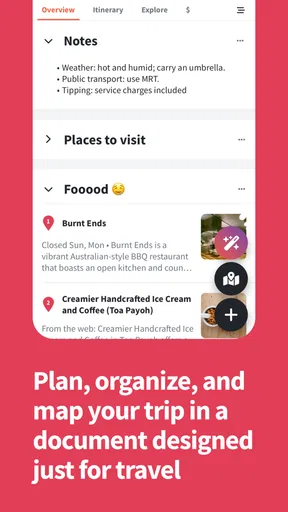
Saving destination articles alongside the plan can keep research close to the places it concerns. I find that useful when I want to remember why I saved something instead of revisiting a browser history full of travel tabs. The trade-off is that saved material still needs a little judgment: an article can inspire a stop, but it does not automatically make that stop a good fit for the day. I would add a short personal note about what caught my attention so the reason remains clear later.
Getting Started with Wanderlog
First things first, downloading the Wanderlog app is a breeze. Available on both Android and iOS, it’s just a tap away on your device’s app store. Once installed, you’re greeted with a clean and intuitive interface that’s easy to navigate. The app asks you to sign up, which is quick and painless, and then you’re ready to roll.
Features That Make Planning a Breeze
One of the standout features of Wanderlog is its ability to sync across devices. Whether you’re planning on your phone, tablet, or computer, everything stays up-to-date. This is perfect for those of us who like to start planning on a big screen and then make adjustments on the go.
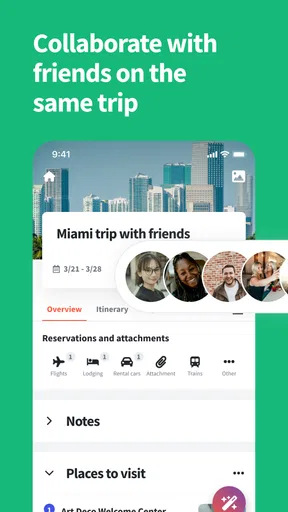
The app also offers collaborative planning, which is a game-changer if you’re traveling with friends or family. You can invite others to your trip plan, allowing them to add their own ideas or suggest changes. It’s like having a virtual travel meeting without all the email clutter.
Organizing Your Itinerary
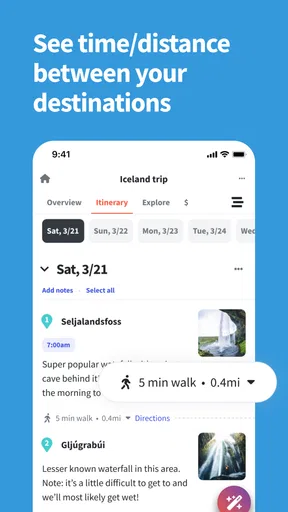
Creating an itinerary is where Wanderlog truly shines. You can map out your entire trip day-by-day, adding attractions, hotels, and even restaurants. The app automatically calculates travel times between locations, which is super handy for ensuring you’re not trying to do too much in one day.
There’s also a nifty feature that lets you save articles and blogs about your destinations. This way, you can keep all your research in one place and refer back to it whenever you need inspiration or reminders.
Budgeting and Expenses
No one likes to think about money when they’re dreaming of faraway places, but it’s a reality we all have to face. Wanderlog helps ease the pain with its budgeting feature. You can track your expenses and make sure you’re staying within your limits. It’s not just for big-ticket items either; you can log everything from your flights to that extra scoop of gelato.
For a shared trip, I would treat the budget as a running overview rather than a perfect financial record. Logging a major cost is likely to be more useful than trying to record every small purchase while everyone is waiting to leave a café. If the group splits expenses in different ways, the plan can still help keep travel costs visible, but I would not assume that an itinerary is a substitute for a dedicated way of settling debts. The value is having spending connected to the trip, not turning planning into bookkeeping.
User Experience and Design
The design of Wanderlog is sleek and modern, with a focus on usability. Everything is laid out in a way that makes sense, and the learning curve is practically non-existent. The use of maps and timelines is particularly effective, giving you a visual representation of your trip that’s easy to digest.
The app also integrates with Google Maps, which is a huge plus. You can see your planned route and get directions without having to switch between apps. It’s small touches like this that make a big difference in user experience.
In everyday use, I would still check the details of a journey when timing matters. A route estimate helps me judge whether the day is overpacked, but actual travel can depend on conditions and the way I choose to get around. I use the itinerary to compare the shape of a day, then leave enough slack for meals, queues, rest, and unexpected detours. That is a more dependable use of estimated travel time than treating it as a promise.
What the free version means in practice
The app is free to download, and it has a 4.8 average from around 30,000 ratings, with more than a million installs. It is rated for Everyone, which makes it accessible for family trip planning as well as individual use. In-app purchases range from $1.99 to $79.99 per item, so I would check what a paid option includes before building a routine around it. The current version is 2.190, and it runs on Android 8.0 or later.
For a straightforward trip, I would begin with the free experience and see whether the core planning flow is enough. The existence of purchases does not mean every traveler needs to pay; it does mean that someone who expects to use every advanced option should review the choices in the app before committing. If all I need is a map, a few saved places, and a basic schedule, paying for extras may not improve the trip enough to justify it.
When the planning starts to feel like work
There is a point where organizing can become its own hobby. Adding every possible café, attraction, and backup makes the map busy and can make the trip feel decided before it starts. I would be wary of spending more time maintaining a detailed itinerary than discussing what the group actually wants. The app is most helpful when it reduces repeated searching and coordination; if maintaining the plan becomes another chore, I would pare it back to confirmed anchors and a short list of alternatives.
Another trade-off is connectivity. The offline functionality could be better: some information may be accessible without a connection, but I would not rely on the app as the only source of essential travel details abroad. Before leaving Wi-Fi, I would keep critical booking information and addresses available in another dependable form. That is not a reason to avoid using the planner; it is a sensible backup for any traveler who may be navigating with limited access.
Looking for Improvements
While Wanderlog offers a lot, there are a few areas where it could improve. For instance, the offline functionality could be better. Although you can access some information offline, having full access without an internet connection would be a real bonus, especially when traveling abroad.
Additionally, while the app is mostly free, some features require a premium subscription. This isn’t uncommon, but it’s worth noting if you’re looking to use all the bells and whistles.
Who will keep using it?
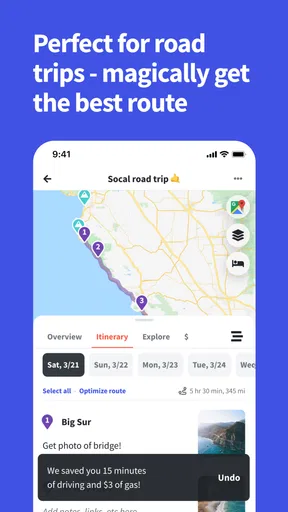
I would recommend it most to travelers who plan multi-stop trips, people coordinating with companions, and anyone who likes to compare a day’s options on a map before setting out. It can also suit a road trip where stops need to be gathered into a coherent route and the group wants one place to review the plan. The recurring benefit is not a novelty animation or a one-time discovery; it is the chance to return to a living trip outline instead of rebuilding the same context from scattered notes.
On the other hand, a traveler who prefers spontaneous days, rarely saves places, or already has a workflow that works well may not gain much. A basic notes app is faster for a short overnight stay, while a map app is enough if the only question is how to get from the hotel to dinner. The useful dividing line is whether I need to organize relationships between places, days, and people. If I do, this planner has a clear role; if not, an extra app can be needless upkeep.
Does it earn a lasting place?
After the first week, the app’s value depends on whether I return to it while plans change. Syncing across devices and collaborative editing can make that worthwhile for a group, while the itinerary, mapped locations, saved research, and expense tracking give solo travelers several reasons to keep one trip organized. The habit I would aim for is modest: add confirmed details when they arrive, review the map when shaping each day, and remove options that no longer matter.
That routine avoids two common frustrations: a stale itinerary that no one trusts and an overfilled one that feels like an obligation. I would not keep every past trip meticulously updated just for the sake of it. Instead, I would use the app when there is a real journey to coordinate, then let the plan rest once the travel is over. Its lasting value is strongest when it saves effort on the next decision, not when it demands attention between trips.
Wrapping Up
Overall, Wanderlog is a fantastic tool for anyone looking to streamline their travel planning. It’s intuitive, feature-rich, and makes organizing a trip almost as enjoyable as the trip itself. Whether you’re a solo traveler or planning a group adventure, this app has something to offer.
So, next time you’re dreaming of sandy beaches or bustling city streets, give Wanderlog a try. It might just become your new favorite travel companion.
Pros
- Intuitive interface for easy trip planning.
- Collaborative features for group travel.
- Offline access to itineraries.
- Integrates with Google Maps for navigation.
- Customizable travel timelines.
Cons
- Limited support for obscure destinations.
- Requires sign-in for full features.
- Some features locked behind paywall.
- Occasional sync issues with cloud.
- Not optimized for tablets.
FAQs for Wanderlog - Trip Planner App
What features does Wanderlog offer for trip planning?
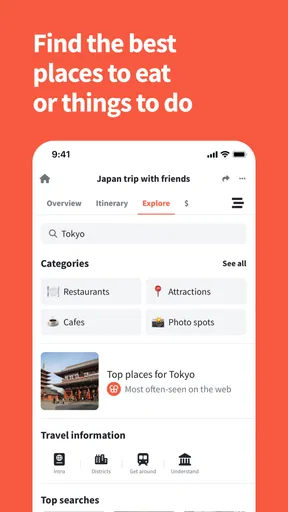
Wanderlog provides a comprehensive set of features to simplify trip planning. It allows users to create detailed itineraries, collaborate with friends or family, and track expenses. Additionally, users can access offline maps and receive recommendations for attractions, restaurants, and accommodations, making it a versatile tool for organizing any trip.
Is Wanderlog available for both Android and iOS devices?
Yes, Wanderlog is available for download on both Android and iOS platforms. Users can easily find the app on the Google Play Store for Android devices and the Apple App Store for iOS devices, ensuring accessibility for a wide range of smartphone users.
Can I use Wanderlog offline during my travels?
Wanderlog offers offline access to maps and itineraries, which is particularly useful when traveling to areas with limited internet connectivity. By downloading the necessary data beforehand, users can continue to navigate and access their plans without needing an active internet connection.
How does Wanderlog handle collaboration for group trips?
Wanderlog supports collaboration by allowing users to invite friends or family to join their trip planning process. This feature facilitates shared itinerary building and easy communication, ensuring everyone is on the same page and able to contribute ideas, making group trips more organized and enjoyable.
Are there any costs associated with using Wanderlog?
Wanderlog offers a free version with essential features for trip planning. However, there is also a premium subscription available that unlocks additional features, such as enhanced collaboration tools and advanced itinerary options. Users can choose the plan that best suits their needs and budget.


